.png)
.png)
Today we're rolling out the most significant update to S.A.F.E. since launch — a redesigned interface, expanded safety monitoring, and self-service controls that put fleet management directly in your hands. The new experience is live for all customers as of today. No action is required, and all your existing data, configurations, and history carry forward seamlessly.
Here's what's new.
A Modernized Portal Experience
The first thing you'll notice is the interface itself. Every page has been redesigned around a cleaner, more consistent layout that surfaces the information you need without the clutter.
- Responsive across devices — optimized for desktop, tablet, and mobile
- Streamlined navigation — a reorganized menu structure that gets you to the right place faster
- Enhanced data visualization — charts and dashboards that make trends visible at a glance
- Consistent visual styling — a unified, professional appearance across every page
Your login URL is unchanged, and existing users retain their current access levels.

Driver Self-Service Portals
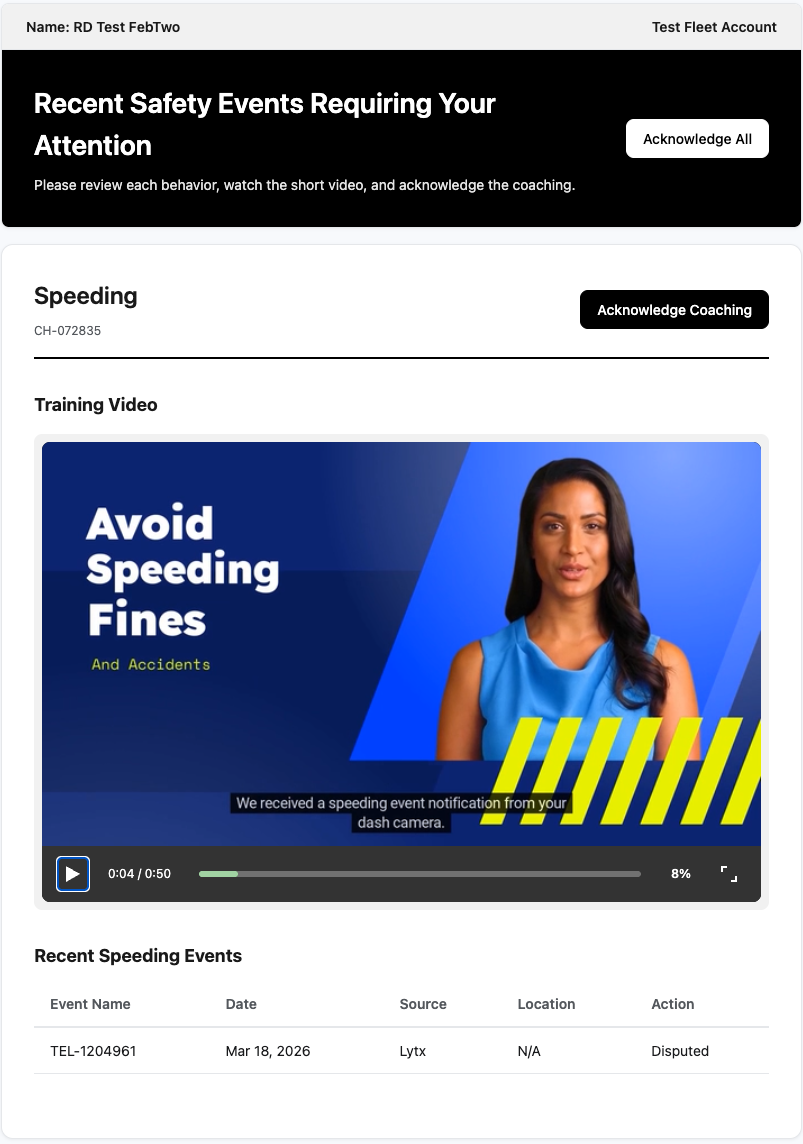
The biggest functional change in this release is how drivers interact with coaching, escalations, and vehicle documentation. Each driver now receives a single daily email linking to their personal portal — no more chasing individual videos or e-signature documents.
Coaching
In the driver coaching portal, drivers can:
- View all pending coaching assignments in one place
- See the related safety events, including date, type, and location
- Dispute specific events directly to management
- Watch coaching videos with progress tracking
- Acknowledge coaching to mark it complete
Coaching Escalations
Coaching Escalations — previously handled through separate e-signature documents — now live in a single portal where drivers can:
- View all pending escalations together
- Watch training videos with a minimum-watch-time completion requirement
- Review the safety events that triggered escalation
- Provide electronic acknowledgment with a full audit trail (IP address, timestamp, and signature captured automatically)
Disputes are not available at the escalation stage, since drivers have already had the opportunity to dispute during coaching.

Vehicle Files
Drivers can now access vehicle documentation assigned to them — registration, annual inspections, and insurance cards. Managers control which files are visible to drivers on a per-vehicle basis, ensuring sensitive documents stay protected.
Updated Safety Scoring Engine
Driver safety performance is evaluated across six components, each contributing to a composite score:
- Camera Events — distracted driving, following distance, speeding, and more
- ELD Compliance — hours-of-service violations and log compliance
- Training Completion — required training and completion rates
- Roadside Inspections — clean inspection rate and violation severity
- Violations — inspection violation severity and frequency
- Incidents — accident history weighted by severity
Scores update automatically as events occur, so you can track trends and identify drivers who need attention before issues escalate. Fleet-level scoring aggregates driver performance with fleet-wide metrics for benchmarking and tracking improvement over time.


New: You can now configure which camera and ELD event types affect scoring, ensuring the system reflects your fleet's safety priorities.
Safety & Compliance Watchlists
The new watchlist system replaces the legacy "Do Not Dispatch" list with two purpose-built monitoring tools.
Safety Watchlist
Flags drivers based on safety performance and outstanding actions:
- Safety score below your threshold
- Excessive camera events in the last 30 days
- ELD violations this month
- Pending coaching escalations
- Past-due training assignments
Compliance Watchlist
Monitors document and regulatory compliance for both drivers and vehicles:
- Expired or expiring CDLs and medical cards
- Missing required documents
- Vehicle registration and insurance status
- Inspection and permit expiration
Flagged drivers and vehicles are highlighted with visual indicators throughout the portal — on dashboards, lists, and detail pages. Thresholds are fully configurable to match your fleet's standards.
.png?width=1200&length=1200&name=logos%20(1).png)
Self-Service User Management
You no longer need to wait on support to add, remove, or update portal users. The new User Access system gives you direct control:
- Add and remove users at any time
- Assign role-based permissions with four predefined roles:
- Admin — full access to all features and settings
- Manager — driver and vehicle management, safety monitoring, coaching
- Recruiter — driver onboarding and document management
- Mechanic — vehicle records, DVIRs, and maintenance
- Configure notification preferences per user — control exactly which alerts each person receives, from document expirations to vehicle alerts

Fleet Settings
Fleet managers now have direct access to configure fleet operations through the new Fleet Settings area, organized across four tabs:
General — DOT number, carrier identifiers, and vendor configuration (camera, ELD, training, DVIR providers)
Driver Portal — enable or disable driver portal access, control what data drivers can see (camera events, ELD data, incidents, inspections), and activate training features
Event Configuration — choose how each camera and ELD event type behaves: Coach and Score, Coach Only, Score Only, or Disabled. Configure escalation thresholds and actions per event type — from automatic retraining to management notification only.
Safety Watchlist — enable or disable watchlist criteria and set thresholds for safety score, camera events, and ELD events
Available settings vary based on your insurance program, contractual requirements, or applicable regulations.

Additional Enhancements
Automatic VIN Decoding — Vehicle records now auto-populate year, make, model, vehicle class, and weight rating when you enter a VIN. No more manual data entry for vehicle specifications.
Getting Started
Detailed guides for every feature are available in our Knowledge Base — look for articles on User Access Management, Safety Watchlists, Safety Scoring, Fleet Settings, and the Driver Portal. Our support team is ready to help with any questions through your usual support channels.
What's Coming Next
We're already working on the next wave of improvements:
- DVIR Template Builder — fully customizable pre-trip and post-trip inspection forms
- Maintenance Management — comprehensive vehicle maintenance tracking and scheduling
- Workflow Automations — additional automated processes to streamline operations
- Redesigned Training Modules — an enhanced experience for both drivers and managers
Roadmap items are subject to change as we incorporate customer feedback and priorities.
.png)